Podcasts
Any q.e.d. site can be a podcast. The episodes are pages of the site, with a player, the people who speak, shownotes and chapters, and q.e.d. writes the feeds that podcast apps subscribe to. Everything stays on your own webspace: the audio, the player, the feeds.
The example on this page is 3 Schweinehunde, a running podcast with four hosts and more than 50 episodes.
Turn it on
In the Podcast tab, switch on This site is a podcast and fill in the settings, then press Save. Three more tabs appear: Audio, Transcripts and Contributors.
About
Name in podcast apps (the site's title if empty), Author (shown below the name) and Description.
3 Schweinehunde: "Birgit, Dominic, Stefan und Steve" as author.
Podcast directories
Owner and Owner email, where directories such as Apple Podcasts send confirmations; Categories from Apple's list (the first counts most); Type, Explicit content and Copyright or license.
3 Schweinehunde: Sports > Running, CC BY 4.0.
Cover art
A square picture, 1400 to 3000 pixels, JPEG or PNG. Podcast apps show it everywhere. q.e.d. checks it against Apple's rules.
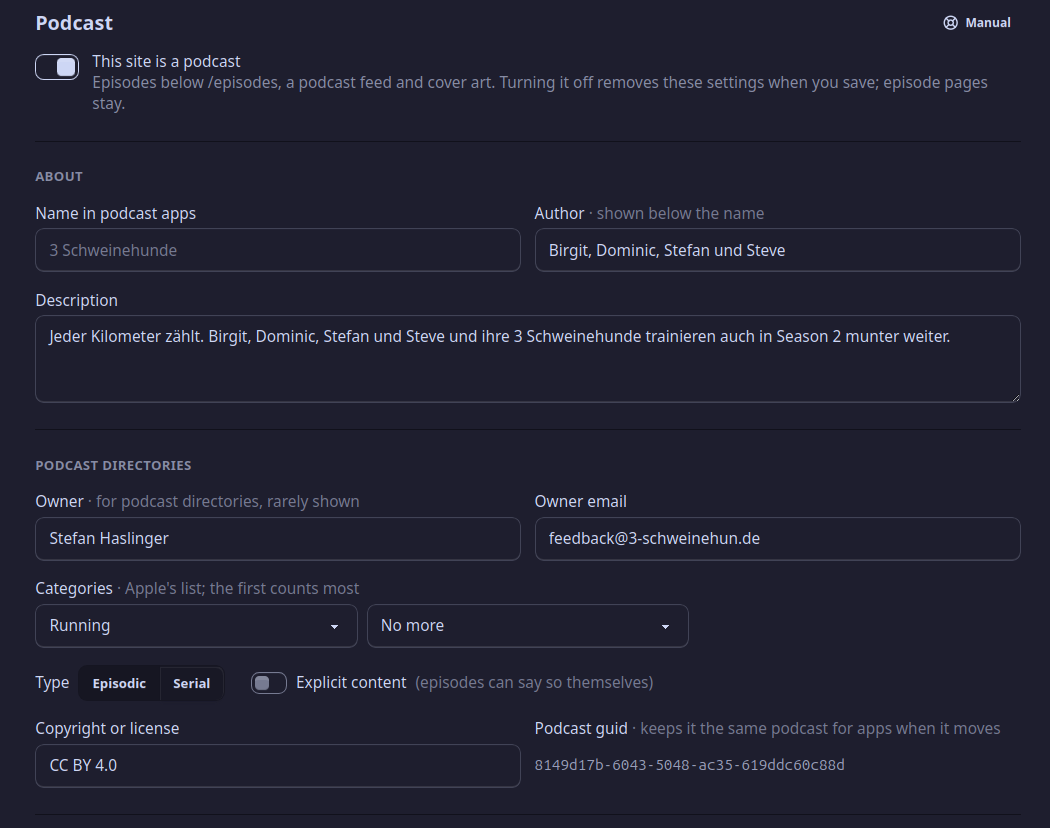
The Podcast tab of 3 Schweinehunde.
Also fill in Copyright or license: it tells listeners what they may do with the episodes (see License and credits).
Team lists the people who make the podcast (see below); new episodes start with them. Support links (Liberapay, Patreon, …) show in podcast apps as "Support".
Audio files
Under Audio files in the Podcast tab:
- Formats: MP3 is enough. More formats (M4A, Ogg, Opus, FLAC) each get their own feed, and every episode then needs a file in each. With more than one, choose the Main format: its feed is the one for Apple and the directories, so it should be MP3 or M4A.
- Where the files are kept:
- In the site, not in versions: in the site, but not in its history. Versions stay small; back up the audio yourself.
- In the site and in versions: in every version too. One backup holds everything, but the history grows by each episode for good.
- Elsewhere: at a podcast host; each episode gives the address of its file.
When the files are in the site, Import audio… in the Audio tab
copies them in, such as 3sh051_trilogie.mp3.
The files of one episode in different formats must be the same recording, cut the same way: the chapters and the length hold for all of them, and listeners switching formats would land in the wrong place.
Contributors
Everyone who speaks in an episode is entered once, in the Contributors tab: New contributor, with Name, a Photo (square works best), Links (website, Mastodon, …) and About them. Each gets a page of their own on the site, listing their episodes.
3 Schweinehunde has 34: the four hosts and the guests of single episodes.
A new episode
New episode in the Pages tab asks for the title and the
number; it counts on from the last episode. The episode is dated today
and goes below /episodes.
The episode's Settings tab has, besides title, date and description:
- Episode: Season, Number, Type (Episode, Trailer, Bonus), Explicit, and an Episode cover (the podcast's cover if empty).
- Audio: Choose… the file for each format from the Audio tab;
q.e.d. reads the Length from it. A Transcript comes from the
Transcripts tab (a WebVTT file,
.vtt). - People: who is in it, each in a role (Host, Guest, …). Someone in two roles gets two rows.
- Chapters: a start time (
01:02:03or02:03) and a title each, in order; a link is optional. Episode 51 of 3 Schweinehunde has an introduction and one chapter for each pair of runners.
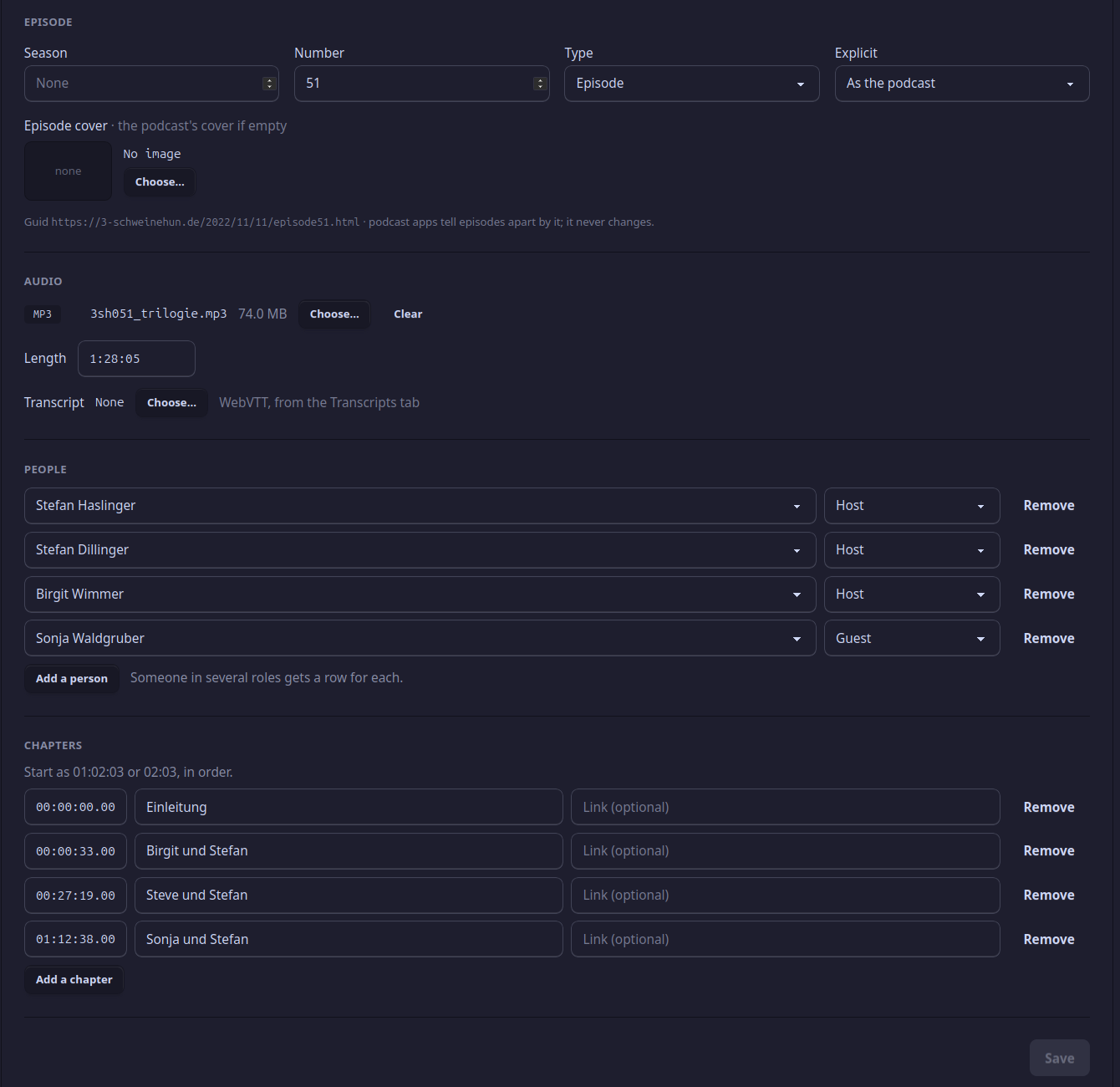
The episode part of the Settings tab, for episode 51 of 3 Schweinehunde.
The episode's own blocks are its shownotes: text, links, pictures, like on any page. A few sentences on what the episode is about, then the links to what was mentioned, are a good start; podcast apps show the shownotes too.
Publish waits for the audio
Every feed needs every episode. As long as an episode that isn't a draft lacks its audio (in one of the formats), Publish says which and waits. Make an episode a draft while it isn't ready.
The episode page
Every episode page shows, below its title: the Player, the People, the Shownotes and the Chapters. The player is the Podlove Web Player, with chapters, transcript and a share tab; without JavaScript, the browser's own player and a download link.
To change that order for all episodes, or to add a block to every episode (a Subscribe button, say), open Episode layout under Templates in the page list. Transcript shows the transcript as text, folded away until a visitor opens it.
Blocks for podcasts
Any page of a podcast site can use:
- Latest episode: the newest episode with its player.
- Subscribe: the Podlove Subscribe Button, which offers the podcast's feeds to the visitor's podcast app.
- Contributors: the people, with photos, each linking to their page.
The start page of 3 Schweinehunde has Latest episode, Subscribe and a Post list of the other episodes.
Feeds and podcast apps
The site needs its Web address (Site tab) for its feeds. They're at
/episodes.mp3.rss (and one per further format), such as
https://3-schweinehun.de/episodes.mp3.rss. Submit that address once to
Apple Podcasts, Spotify and the other directories; after that, they pick
up each new episode when you publish.
Can I add a podcast to a site that already exists?
Yes. Turn it on in the Podcast tab; the pages stay as they are, and the episodes go below /episodes.
What happens to the episodes when I turn the podcast off?
The podcast settings go when you save; the episode pages stay, as ordinary pages.
My podcast is somewhere else now. Can I bring it over?
See Moving a site over.