Publishing
q.e.d. builds the website on your computer and copies it to your webspace, the space for a website your hosting company gives you. It uses SFTP, a secure way of copying files that almost every hosting company offers. Nothing runs on the server: the website is plain files, fast and cheap to host.
Before the first time
Your hosting company gives you four things, usually in its customer area or in the e-mail from when you signed up:
- the server, such as
ssh.example.com - your user name
- a password, or the option to log in with a key
- the folder on the server the website goes in, such as
/wwwor/home/you/public_html
Also enter the site's web address in the Site tab: feeds, link previews and the sitemap need it.
Set up a target
A target is a place the site is published to. In the Publish tab,
Add target and fill in the four things, with a Name
for it, such as Website. With Log in with: Key, q.e.d. makes a key
for this server; copy it into your hosting company's settings for SSH
keys (or the server's ~/.ssh/authorized_keys). Then Save target.
Passwords and keys are kept in your computer's keychain, never in the site folder, so they don't end up in backups or on other computers.
Test, then publish
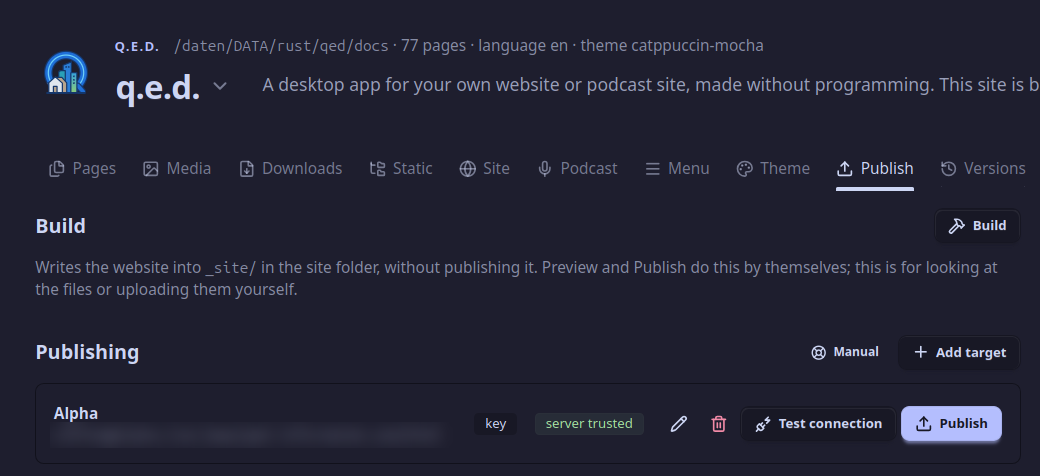
A target that's been tested: server trusted, ready to Publish.
- Test connection. The first time, q.e.d. shows the server's key fingerprint, its proof of identity. If your hosting company publishes it, compare; then Trust. From now on q.e.d. notices if a different server answers at that address.
- Publish. q.e.d. asks What's new on the site?: a few words for the history, such as Summer opening hours. Then it builds the website and copies only the files of the website that differ on the server.
- Open the website to look at it online.
Files q.e.d. didn't upload itself are never touched on the server, so other things in the same folder stay as they are.
Publish said 3 of my files changed, but uploaded 57. Why?
Your files and the website's files are two things. The Publish dialog lists the files you changed in q.e.d., such as one page. The website is built from all of them, and one change can show on many of its pages: a page's title is in every page's menu, a new post in the Post lists and in the back and next links. Publish uploads every file of the website that differs from the one on the server, so the count after publishing (57 website files uploaded) is often bigger.
Do I have to build first?
No. Publish builds the site by itself. Build in the Publish tab is for looking at the files, or uploading them yourself.
Can I see the website before it goes online?
Yes: the button in the top right corner shows it in your browser, from your computer only.
Publish waits for an episode. Why?
On a podcast site, every published episode needs its audio file, in every format the podcast offers, or podcast apps would get a broken episode. Add the audio, or mark the episode as a draft until it's ready.
Is the old website gone when I publish?
q.e.d. replaces what it put there before and adds what's new. Files it didn't put there stay. Every publish is also marked in the site's history, so you can see what was online when.